BRoll King: AI Video Editor Raw footage in.
Finished edit out.
BRoll King watches your talking-head video the way an editor would: it finds the silences, the filler words, the takes you restarted and the asides you never meant to keep, then plans B-roll around what you actually say, zooms in on the moments that matter and burns in captions. You approve every cut and every clip.
No spam, one email at launch. Unsubscribe any time.
The iPhone app is the part that's ready
Same pipeline, on your phone: clean the A-roll, plan the B-roll, caption, render and save to Photos. It's coming to the App Store first — the web app is next.
What it looks like
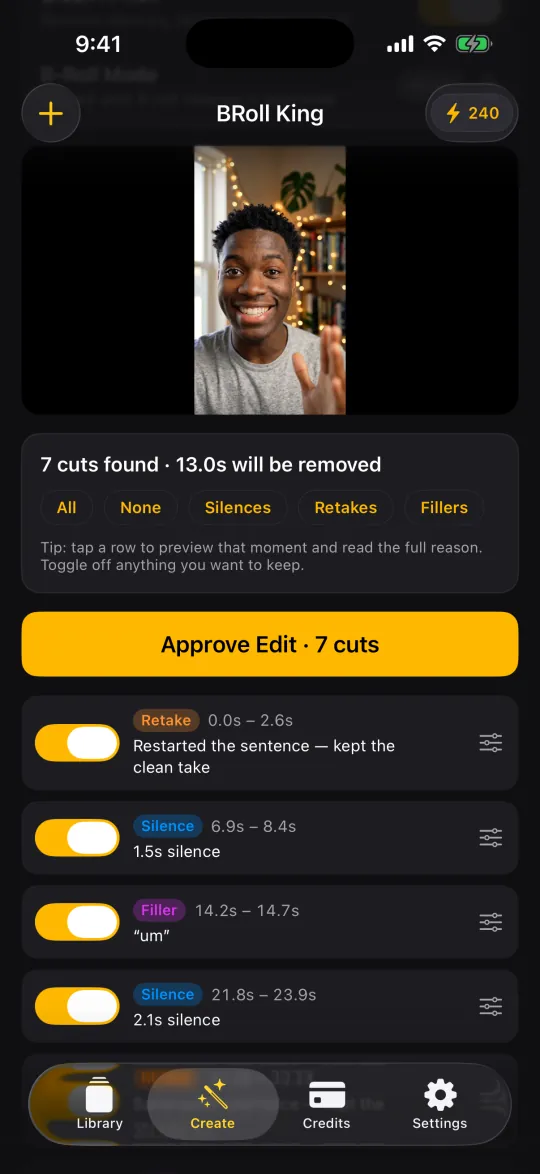
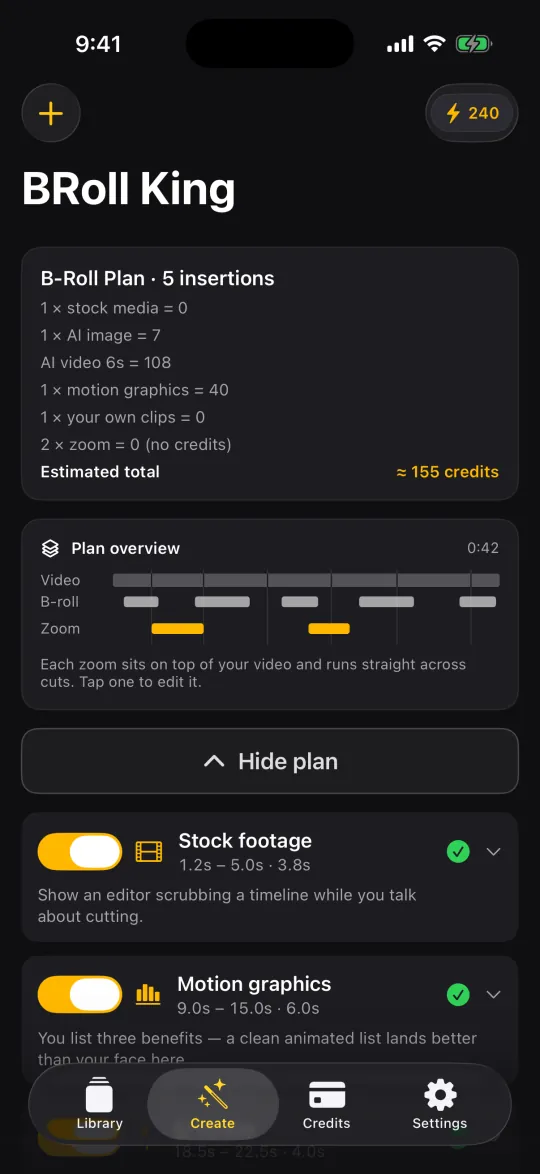
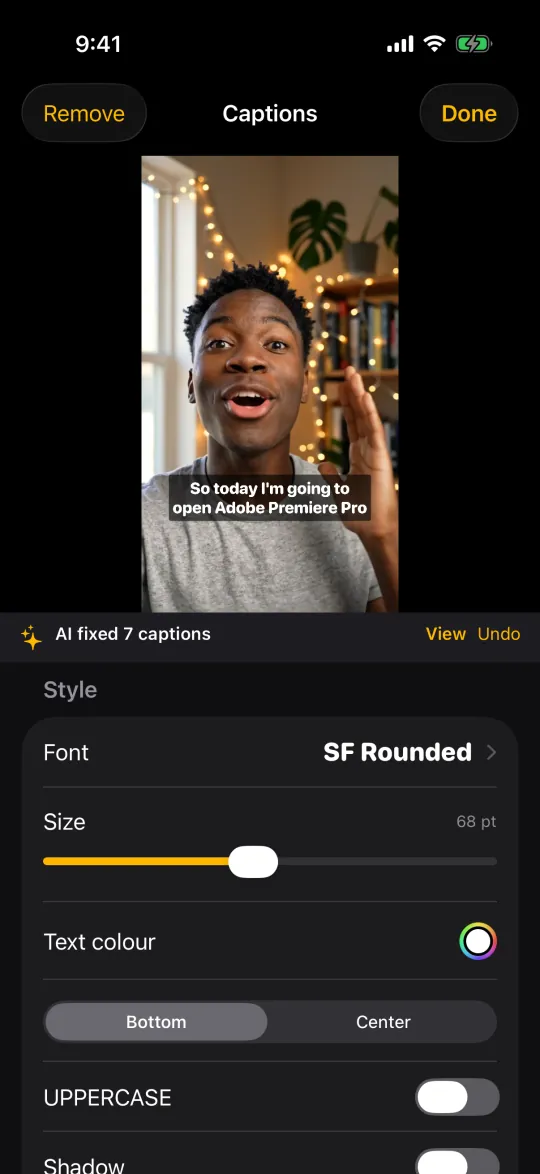
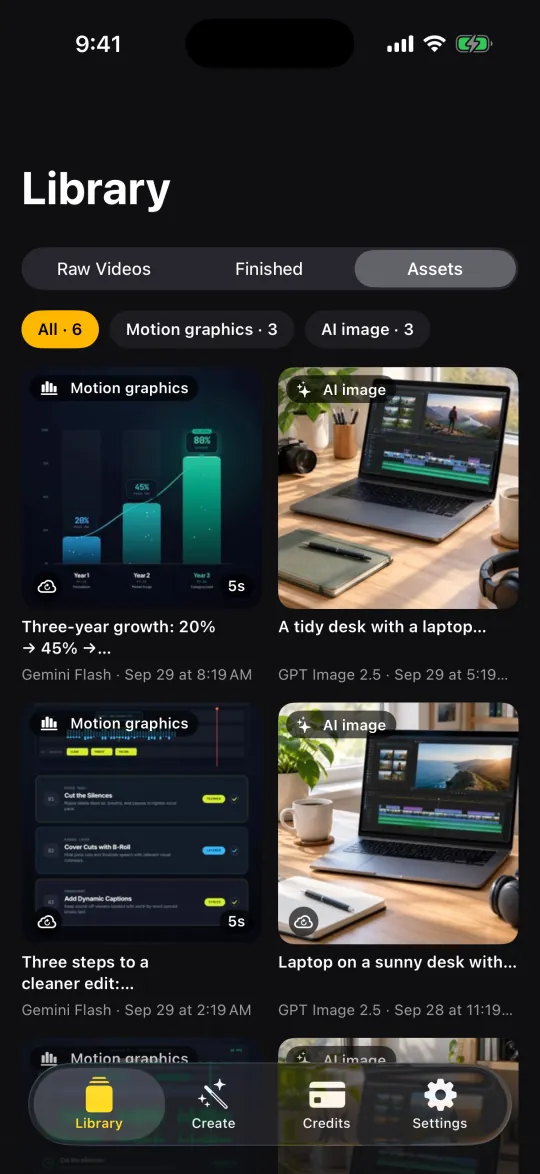
Screens from the iPhone app, filled with a sample project. The presenter in the sample video is AI-generated.
More screens on the iOS page.
Who it's for
Anyone who films themselves talking and does not want to spend the evening on a timeline.
Creators
YouTube, Shorts, Reels and TikTok. Weekly output without a weekly edit.
Coaches & educators
Course modules and lesson clips that stay watchable all the way through.
Founders & marketers
Product explainers and updates, recorded once and shipped the same day.
Podcasters
Turn a recorded segment into a clip with visuals, not a static talking head.
How it works
Four steps. You stay in charge at every one of them.
Sign in and bring your footage
Sign in with Apple, Google or email and pick a recording. Only the audio is sent up for transcription — your full-resolution video is never uploaded.
Approve the cuts
Silences, filler words, restarted takes and off-script asides come back as a reviewable list. Restore anything, nudge the in and out points, then approve.
Review the B-roll plan
The transcript drives a plan: what to show, when, why, and where to zoom. Swap a source, generate a new prompt, use your own clip, or delete the insert. The credit estimate comes first.
Caption and render
Captions are built from the word timings and checked for misheard names, then everything is composited on your iPhone into a video you can save or share.
What's in it
A-roll cleaner
Silence and dead air are measured on your phone. The transcript adds the "um"s, the sentences you restarted, the lines you said twice and the off-script asides — each with the reason it was flagged.
Careful with retakes
Four levels, from Off to Aggressive. The default, Balanced, only removes a line you clearly said twice and keeps your later take. An AI retake review, on by default, also catches the ones you reworded.
Premium transcription
Every video gets a word-timed transcript from a premium speech model — it drives the cuts, the plan and the captions. The spoken language is detected automatically.
B-roll planned from your words
Stock photos and footage, AI images, AI video and animated motion graphics — or your own clips. Each insert carries its timing and the reason it was suggested, so you can judge it quickly.
Generate prompt
Switched an insert to AI video or stock? One tap writes a fresh prompt or search term for that exact moment. Tap again for another take.
Zooms that find your face
The plan suggests punch-ins and slow push-ins at key moments. On-device face detection aims them at you, each zoom is one smooth move — even across cuts — and you can preview any of them.
Captions worth reading
29 fonts in five styles, text colour, a background box, shadow, outline, position and casing. Long captions wrap onto as many lines as they need but never cover more than 45% of the frame. 18 animated styles — Word box, Highlight, Karaoke, Pop and more — play live on your video before you render (10 credits per video; plain captions cost nothing extra).
AI caption review
Fixes misheard names, brands and terms plus punctuation, without rewriting you or moving the timing. Every change can be viewed and undone. On by default.
Library › Assets
Every AI image, AI video and motion graphic you generate is kept on your iPhone. Ask for the same clip again and it's reused at no charge — or pick any asset by hand as B-roll.
"Ready" notifications
Switch to another app while your B-roll is being created and get a notification when it's ready. The final render runs on your phone, so keep BRoll King open for that last step.
Content safety built in
AI image and video prompts are checked against our content rules before any credits are spent. A blocked prompt costs nothing.
Rendered on your phone
Cuts, B-roll, zooms and captions are composited on the device and exported at your video's own resolution and frame rate, with soft dissolves and audio crossfades at every cut. Keep the app open while it renders — the screen won't lock.
- Stock photos & footage
- AI images
- AI video
- Motion graphics
- Your own clips
Pricing
One subscription, three sizes. Every plan includes the whole app; the plan decides how many credits you get each month for transcription and AI generation. Every new account starts with 250 free credits for your first 30 days, no card needed; then a plan.
Starter
$19/month
or $159/year (about $13.25/month) — about 30% less
- 750 credits every month
- Enough for regular videos with stock and AI images
Pro Popular
$39/month
or $329/year (about $27.42/month) — about 30% less
- 1,600 credits every month
- Room for AI video and motion graphics every week
Power
$99/month
or $829/year (about $69.08/month) — about 30% less
- 4,000 credits every month
- For daily publishing and heavy AI video use
Every plan includes
- Silence, filler-word, retake and aside detection (AI retake review: 3 credits a minute, 10 minimum)
- Full cut review and timeline editing
- Premium transcription of your video (credits per minute)
- Stock photo (5 credits) and stock footage (10 credits) B-roll, AI fit check included
- Face-aware zooms, no credits used
- Captions with 29 fonts and styling, AI spelling fixes (5 credits) and 18 animated styles (10 credits per video)
- Library › Assets: generated clips kept and reused free
- Render and export on your iPhone
How credits work
- Your first 30 days: 250 free credits, no card needed — unused free credits expire at day 30
- Monthly credits reset each billing period and don't roll over
- Yearly plans are billed once a year; credits still arrive every month
- Need more? Extra 500-credit packs ($16.99) never expire — for paying subscribers
- Jobs that fail on our side are refunded automatically
Subscriptions are billed through the App Store and renew automatically until you cancel in Settings → [your name] → Subscriptions. US prices shown; your local price is shown in the app before you subscribe. Web app pricing is announced at launch.
| Action | Credits |
|---|---|
| Premium transcription | 3 per minute |
| B-roll plan for a video | 26 |
| Re-plan the whole video | 10 |
| Generate prompt for one B-roll moment | 1 |
| AI retake review (on by default) | 3 per minute (min. 10) |
| AI caption review (on by default) | 5 |
| Animated captions (per video) | 10 |
| Post description: title, text and hashtags | 5 |
| Cover image made from your best frame | 15 |
| Background music (instrumental), per 30 seconds | 50 |
| Stock photo, AI fit check included | 5 |
| Stock footage clip, AI fit check included | 10 |
| Zooms, silence scan, cut review, timeline editing and rendering on your phone | 0 |
| AI image | 7 – 78 |
| AI video | 9 – 55 per second |
| Motion graphics scene | 40 – 260 |
Transcription has a 15-credit minimum per video, and re-analysing the same video doesn't charge again. Ranges depend on the AI model you pick in Settings. Defaults: GPT Image 2.5 for images (7 credits), Veo 3.1 Lite for video (15 per second) and GPT-6.1 Sol for motion graphics (65). Regenerating an insert costs the same as generating it; reusing it from Assets is free. Stock is only charged when a clip or photo is delivered — if the search finds nothing that fits, it costs nothing.
| A 3-minute video with… | Credits |
|---|---|
| Stock B-roll only: 3 stock photos and 1 stock clip (plus transcript, plan, AI retake and caption reviews, animated captions) | 91 |
| … plus 4 AI images and 1 motion graphic | 184 |
| … plus one 5-second AI video clip | 259 |
Starter's 750 monthly credits cover about 8 of the first, 4 of the second or 2 of the third. The app shows the estimate for your own plan before anything is generated.
Common questions
Do I need to know how to edit?
No. BRoll King proposes the edit and you approve it. If you do know your way around a timeline, every threshold, cut and clip is still yours to override.
Do I need an account?
Yes. The app opens with sign-in — Apple, Google or email. Transcription and generation run on our servers and are paid from your account's credits, so your plan and balance follow you to a new phone.
Is my video uploaded somewhere?
Your full-resolution video is not uploaded. Audio is extracted and sent up only so it can be transcribed, and it is deleted as soon as the job finishes. Details are in the privacy policy.
Which languages does it understand?
BRoll King transcribes videos in 90+ languages and detects the spoken language automatically. Accuracy varies by language. Details are in support. The app's interface is available in 12 languages: English, Spanish, Portuguese (Brazil), French, German, Turkish, Indonesian, Chinese (Simplified), Japanese, Korean, Arabic, Russian.
What if I disagree with a cut?
Then it doesn't happen. Cuts are proposals on a timeline until you approve them — restore any of them, or drag the in and out points first.
Where does the B-roll come from?
Four sources: stock photos and footage from Pexels, AI-generated images, AI-generated video, and animated motion graphics built for the moment they land on. You can swap the source on any insert, or use your own clips instead. A stock photo costs 5 credits and a stock clip 10, including an AI check that picks the result that best fits the moment.
What happens to the AI clips I generate?
They're kept in Library › Assets on your iPhone. If a later edit asks for the same clip, it's reused at no charge, and you can pick any asset by hand as B-roll. If an edit stops half-way, clips you already paid for in the last 3 days are restored from your account automatically.
Do credits expire?
Your plan's credits are a monthly allowance: they reset at the start of each billing period and unused ones don't roll over. Extra credit packs you buy on top never expire — they carry over every month and stay usable even if you cancel.
How do the free credits work?
Every new account gets 250 free credits for your first 30 days, no card needed; then a plan. Spend them on anything — transcripts, B-roll plans, AI images, AI video and motion graphics. When they run out or the 30 days end, whichever comes first, pick a plan to keep going; unused free credits expire at day 30. The free credits are given once per iPhone.
How do I cancel?
In iPhone Settings → [your name] → Subscriptions, or Manage Subscription inside the app (Settings, or Account on the plans screen). You keep your plan until the end of the period you've paid for. Refunds for App Store purchases are handled by Apple.
When does the web app open?
It is in development. The iPhone app is the version that's ready first — join the waitlist above and you'll hear the day the web version opens.
Stop paying for the boring half of editing
Get the web app in your inbox the day it opens — the iPhone app comes first.